The Jetfighter

Flight simulation old and new

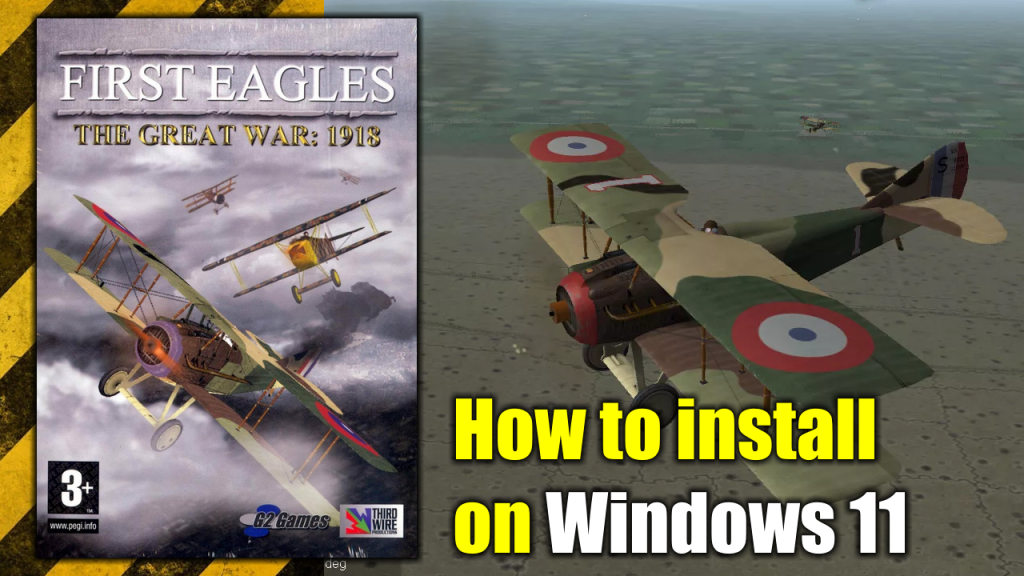
How to Install “First Eagles: The Great War 1918” on Windows 11

How to Install "First Eagles: The Great War 1918" on Windows 11
How to Install “First Eagles: The Great War 1918” on Windows 11

First Eagles: The Great War 1918 is one of the very first flight simulation games published by Thirdware Productions back in 2006. It stands out from the rest of the games produced by the company by being set on World War I and simulating old planes from that era instead of jets.

I have to say this game is awesome. By flying an old WWI plane, you only rely on a pair of machine guns and your skills to get out alive from any mission. No fancy computer locking other planes for you and no missiles shooting down enemies from miles away.

Here you have to get up close and personal with the enemy, manually aim your guns and decide yourself when to make the shots while other planes get also close and personal with you in an attempt to send you out to meet Saint Peter. Once the battle begins there is no time to rest.

So, what are you waiting for? here’s how to install “First Eagles: The Great War 1918” on Windows 11.

Software needed

In order to install First Eagles: The Great War 1918 in your Windows 11 PC you need to have the following list programs:

1. The installation CD/DVD or .ISO image of First Eagles: The Great War 1918.

2. The First Eagles: The Great War 1918 official October 2008 patch. It can be downloaded from MEGA by clicking here.

3. The HDR Mod 1.01A. Available for download at CombatAce, an excellent online community of flight simulation players and modders.

4. 3. dgVoodoo, a legacy DirectX and Glide graphics card API wrapper/implementation program1 that provides support to run Windows and DOS-based old programs using Glide or DirectX. Available for download here.

Installation process 

Before we begin: If you have a Windows 10 PC, this whole process also works for Windows 10 based PCs. Now let’s continue with the install.

Once you have all the required software at hand, we can proceed with the installation of First Eagles: The Great War 1918 on your Windows 11 PC. The installation process will be as follows:

1. Insert the First Eagles: The Great War 1918 CD/DVD on mount the .ISO image and open the setup file. This is one of those “click Next and then Next” cases until the installation is completed.

Do NOT open the game yet, it still will be unplayable at this point.

2. Open the First Eagles: The Great War 1918 official October 2008 patch (FE_Update_Oct2008.exe) and complete the installation process, another case of “click Next and then Next”. Just remember to install this patch in the same folder the game was installed.

3. Unzip the HD1.01 mod into a new directory then open the enbseries.ini file using a text editor and find and change the following command line from:

[GLOBAL]

UseEffect=1 

to

[GLOBAL]

UseEffect=0

Then save the enbseries.ini file.

4. Copy the modified enbseries.ini and the unzipped d3d9.dll into your game install directory, copy a second copy of the enbseries.ini into your Flight sub-directory of your game install directory (this is very important).

5 Unzip the dgVoodoo file into a different folder and look for a file called DDraw.dll. Then copy this file into the First Eagles: The Great War 1918 install directory.

6. Open, play and enjoy First Eagles: The Great War 1918 on your Windows 11 PC.

Wings Over Vietnam: multiplayer gameplay

Wings Over Vietnam: multiplayer gameplay

I found out about the Strike Fighters saga playing the base game Strike Fighters 2. For me, this game offers a perfect combination between hard core simulation and arcade style combat flight gameplay and, even though the game has been around for a while (it was released in 2008), has a great community of players and modders that has improved, expanded and kept the game alive for more than a decade.

But, despite being an excellent flight simulation videogame, Strike Fighters 2 has a big flaw: its total lack of multiplayer capabilities. Something that a game like this desperately needs and has even been asked to its developer but with no answer for it.

A multiplayer past

Since the game I knew first has a number two in the name, I wanted to play the beginning of the saga since the same community of players and modders I mentioned earlier let me know that those first games did have the multiplayer option available.

Unfortunately, those games were not compatible with the new versions of Windows since they were released in 2004, the times of Windows XP. Fortunately, as time passed by, I found out that there is a way to make those games to work on modern PCs. Process I shared in this page a couple of posts ago.

Wings Over Vietnam Multiplayer

Just as Strike Fighters 2, this first saga has different chapters/upgrades, one of those chapters/upgrades is known as Wings Over Vietnam. Once I got it to work on Windows 11, I wanted to test the so-called multiplayer this first games had and how good or bad it is.

I tried to find someone to test it over Internet with no avail. So, due to the lack of voluntaries I set up my own LAN network at home to make a multiplayer test flight. Long story short, it worked!

In the video bellow I show how I set up the multiplayer session on both PCs and its performance.

The Jetfighter’s Christmas Special II

The Jetfighter's Christmas Special II
The Jetfighter’s Christmas Special II

I opened this channel to share my love for my two hobbies: Retro Gaming and Flight Simulators. Even though this channel is pretty new, and its content is very “niche”, I have received a quite unexpected amount of support.

Throughout this year I found out there’s something called “gaming groups” where you can organize online flights and friendly combats with people that share your very same interests, a totally new and unexpected experience that made me know a lot of people and make some good online friendships.

My new Discord server

I even shook off the dust off an old Discord account I had laying there unused because of my total lack of knowledge on how to work with that social network. I can proudly say that thanks to the people I’ve met from my YouTube channel I learned how to use it and even create my own Discord server, to which you’re all totally invited to join.

And now, the Christmas Special II

You might wonder, if this is the Christmas Special II, where’s the Christmas Special I? Well, last year this website didn’t exist, it was a “YouTube exclusive” sort of video. But you can totally watch it by clicking here, it’s a fun video I recommend you see, you won’t be disappointed.

And now, without further ado, as a big thanks for the support, you’ve given to my channel and to wish you all a Merry Christmas and a Happy New Year I made this Christmas Special. I hope you like it and don’t forget to give it a like, share it, leave a comment, and off course Subscribe to my Youtube Channel!

Page 15 of 22

Powered by WordPress & Theme by Anders Norén